
Windows sockets, commonly known as Winsock, form the foundational interface that enables network communication in Microsoft Windows operating systems. Every time an application connects to a web server, sends an email, or exchanges data over a network, it relies on Windows sockets to establish and manage that connection.
Although the concept originates from the Berkeley sockets API developed for UNIX systems, Windows sockets adapt and extend that model to the Windows architecture. Understanding how Windows sockets work provides valuable insight into how applications communicate over TCP/IP networks — knowledge that is essential for engineers, developers, and networking professionals alike.
In this article:
- What Are Windows Sockets?
- How Windows Sockets Work
- The Winsock Architecture in Windows
- Basic Windows Sockets Programming Example
- Why Windows Sockets Still Matter Today
- Conclusion
1. What Are Windows Sockets?
At its core, a socket is an endpoint for bidirectional communication between two processes over a network.
Windows sockets (Winsock) are the Microsoft implementation of the Berkeley sockets API. They provide a standardized interface that allows applications to use network protocols such as TCP and UDP without directly interacting with the lower layers of the operating system’s networking stack.
In practical terms:
- A browser uses Windows sockets to connect to a web server.
- An email client uses them to send and receive messages.
- A multiplayer game relies on them to exchange real-time data.
The key idea is abstraction.
Applications do not need to understand packet routing, IP fragmentation, or driver-level details. Instead, Windows sockets expose a structured API that allows developers to:
- Create communication endpoints
- Establish connections
- Send and receive data
- Terminate communication gracefully
This abstraction is one of the reasons the sockets model has endured for decades.
2. How Windows Sockets Work
To understand Windows sockets properly, it helps to examine the typical lifecycle of a socket in a TCP client-server scenario.
The Socket Lifecycle
1️⃣ Initialization
Before using Windows sockets, an application must initialize the Winsock library:
WSAStartup(MAKEWORD(2,2), &wsaData);
This step loads the Winsock DLL and prepares internal structures.
2️⃣ Creating a Socket
A socket is created using:
socket(AF_INET, SOCK_STREAM, IPPROTO_TCP);
Parameters define:
- Address family (IPv4 or IPv6)
- Socket type (stream for TCP, datagram for UDP)
- Protocol
3️⃣ Client-Server Connection Model
On the server side:
bind()associates the socket with an IP address and port.listen()places the socket in passive mode.accept()waits for incoming connections.
On the client side:
connect()establishes a connection to the server.
Once the connection is established, both sides can use:
send()to transmit datarecv()to receive data
4️⃣ Closing the Socket
Communication ends with:
closesocket(sock);
WSACleanup();
This ensures resources are released properly.
TCP vs UDP in Windows Sockets
Windows sockets support multiple protocols, but the most common are:
TCP (Transmission Control Protocol)
- Connection-oriented
- Reliable
- Ordered data delivery
- Error checking and retransmission
Used for:
- Web browsing (HTTP/HTTPS)
- File transfers
UDP (User Datagram Protocol)
- Connectionless
- Faster
- No guarantee of delivery
- Lower overhead
Used for:
- Real-time gaming
- Streaming
- DNS queries
The API usage is similar, but UDP does not require connect() in the same way TCP does.
Blocking vs Non-Blocking Sockets
By default, Windows sockets operate in blocking mode, meaning:
recv()will wait until data arrives.accept()will wait for a connection.
However, applications requiring high scalability (such as web servers) typically use:
- Non-blocking mode
- Event-driven I/O
- Overlapped I/O
- I/O Completion Ports (IOCP)
These mechanisms allow efficient handling of thousands of simultaneous connections.
3. The Winsock Architecture in Windows
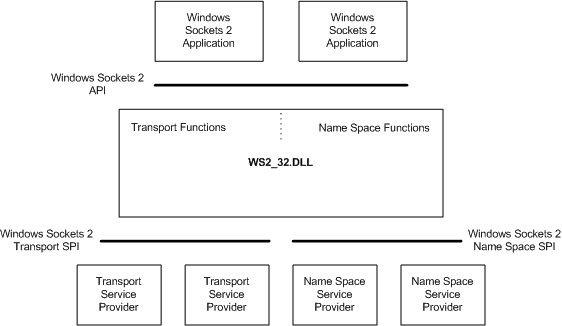
Windows sockets are implemented through a dynamic link library:
ws2_32.dll
This library acts as an interface between applications and the Windows TCP/IP stack.
Winsock 1.1 vs Winsock 2
- Winsock 1.1 supported basic TCP/IP functionality.
- Winsock 2 introduced support for:
- Multiple protocols
- Overlapped I/O
- Protocol-independent APIs
- Improved scalability
Developer audience
Windows Sockets 2 is designed for use by C/C++ programmers. Familiarity with Windows networking is required.
Run-time requirements
Windows Sockets 2 can be used on all Windows platforms.
For a complete guide about Windows Sockets 2 click here.
Modern Windows systems use Winsock 2.
Service Provider Model
Winsock uses a modular architecture based on:
- Service Providers
- Layered Service Providers (LSPs)
This design allows additional networking features — such as filtering, encryption, or monitoring — to be inserted between the application and the transport layer.
Although LSPs were widely used (including by antivirus software), they have largely been replaced by more modern filtering frameworks due to stability and security concerns.
Position in the Networking Stack
Conceptually, Windows sockets sit:
Application
↓
Winsock API
↓
TCP/IP Stack
↓
Network Interface Driver
↓
Physical Network
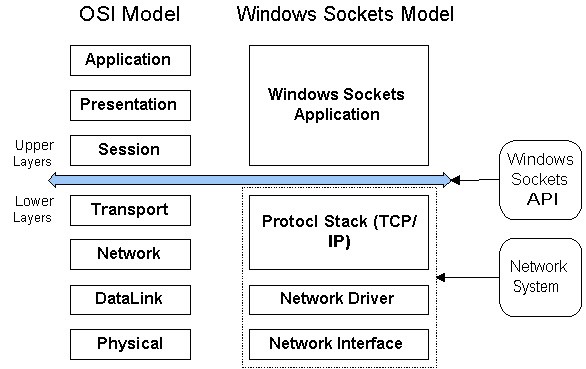
This separation ensures portability and modularity.
4. Basic Windows Sockets Programming Example
Below is a simplified conceptual TCP client example:
#include <winsock2.h>
#include <stdio.h>

int main() {
    WSADATA wsaData;
    SOCKET sock;
    struct sockaddr_in server;

    WSAStartup(MAKEWORD(2,2), &wsaData);

    sock = socket(AF_INET, SOCK_STREAM, 0);

    server.sin_family = AF_INET;
    server.sin_port = htons(80);
    server.sin_addr.s_addr = inet_addr("93.184.216.34");

    connect(sock, (struct sockaddr *)&server, sizeof(server));

    send(sock, "GET / HTTP/1.1\r\n\r\n", 18, 0);

    closesocket(sock);
    WSACleanup();

    return 0;
}
Key observations:
WSAStartup()is mandatory.- Windows uses
closesocket()instead ofclose(). - Error handling is performed with
WSAGetLastError().
Although this example is minimal, it illustrates the structured and predictable nature of the Windows sockets API.
5. Why Windows Sockets Still Matter Today
Despite the rise of high-level frameworks and cloud-native platforms, Windows sockets remain foundational.
Modern technologies that depend on Windows sockets include:
- Web browsers
- Database servers
- Microservices
- Cloud SDKs
- .NET networking libraries
- PowerShell remote management
Even when developers use high-level abstractions such as:
- .NET
HttpClient - ASP.NET Core
- gRPC
- REST APIs
At the lowest level, communication still flows through Windows sockets.
Understanding this layer provides:
- Better debugging capability
- Performance optimization insight
- Security awareness
- Architectural clarity
In distributed systems engineering, foundational knowledge is never obsolete.
6. Conclusion
Windows sockets are more than a legacy networking API — they are the structural backbone of network communication in Microsoft Windows environments. By abstracting the complexity of the TCP/IP stack into a consistent programming model, Winsock enables developers to build scalable, reliable, and efficient networked applications.
For engineers and networking professionals, mastering the fundamentals of Windows sockets is not merely academic. It is a gateway to understanding how modern distributed systems actually operate beneath their abstractions.