
In a world where milliseconds matter, reliability is not always the top priority — speed is.
When you join a video call, stream a live football match, play an online game, or query a DNS server, you’re relying on a protocol that chooses efficiency over perfection. That protocol is UDP — the User Datagram Protocol.
Unlike Transmission Control Protocol (TCP), UDP doesn’t establish connections, doesn’t guarantee delivery, and doesn’t retransmit lost packets. And yet, it powers some of the most critical real-time services on the Internet.

Why would engineers deliberately choose a protocol that doesn’t guarantee delivery?
Because sometimes, waiting is worse than losing.
This article explains UDP from first principles — how it works, why it exists, where it shines, and when it should (and absolutely should not) be used.
In this article:
- What Is UDP and Why Does It Exist?
- How UDP Works Under the Hood
- UDP vs TCP: Engineering Trade-Offs
- Real-World Use Cases of UDP
- When NOT to Use UDP
- Download Infographics
1. What Is UDP and Why Does It Exist?
A Protocol Designed for Speed
The User Datagram Protocol (UDP) is a transport-layer protocol designed with one core principle in mind: minimal overhead for maximum speed.
It operates at the Transport Layer (Layer 4) of the OSI model and is part of the TCP/IP suite — alongside Transmission Control Protocol (TCP).
But unlike TCP, UDP makes a radically different design choice:
It does not guarantee delivery, ordering, or duplication protection.
That may sound like a limitation — but in many real-world systems, it’s actually an advantage.
Why UDP Exists: The Engineering Motivation
When the Internet protocols were designed, engineers recognized that not all applications have the same requirements.
Some applications need:
- Guaranteed delivery
- Ordered packets
- Congestion control
- Reliability mechanisms
Others need:
- Low latency
- Minimal delay
- Low overhead
- Tolerance to occasional packet loss
TCP was built for the first category. UDP was built for the second.
Instead of creating a one-size-fits-all solution, the architects of the Internet designed two transport protocols with different trade-offs.
UDP exists because reliability is not always more important than timeliness.
Connectionless by Design
UDP is described as a connectionless protocol.
What does that actually mean?
Unlike TCP, UDP does not:
- Perform a three-way handshake
- Establish a session
- Maintain connection state
- Track sequence numbers
- Implement retransmission mechanisms
When an application sends data using UDP, the protocol simply:
- Wraps the data in a UDP header
- Passes it to IP
- Sends it toward the destination
That’s it.
There is no negotiation phase. No acknowledgment process. No follow-up.
Each packet — called a datagram — is treated independently.
Stateless Communication
UDP is also stateless.
This means:
- The sender does not maintain information about the receiver.
- The receiver does not track ongoing sessions.
- Each packet is processed in isolation.
From an implementation standpoint, this makes UDP extremely lightweight.
From an engineering standpoint, it reduces:
- Memory usage
- CPU overhead
- Latency introduced by protocol logic
However, it also means the application itself must handle reliability if needed.
UDP in the OSI and TCP/IP Models
In the OSI model:
- UDP operates at Layer 4 — the Transport Layer
- It sits above IP (Layer 3)
- It serves applications at Layer 7
In the TCP/IP model:
- UDP is part of the Transport Layer
- It works directly with IP to deliver packets between hosts
Conceptually, UDP’s role is simple:
Provide port-based multiplexing without enforcing reliability.
Ports allow multiple applications on the same host to send and receive traffic simultaneously. For example, a system can handle DNS queries and video streaming traffic at the same time because each service listens on a different port.
A Simple Analogy
Imagine sending postcards instead of registered letters.
- With a registered letter (TCP), you receive confirmation that it arrived.
- If it gets lost, it is resent.
- The sender tracks the entire exchange.
With a postcard (UDP):
- You drop it in the mailbox.
- It may arrive.
- It may arrive out of order.
- It may never arrive.
But it gets there faster — and with less bureaucracy.
For applications like live video or gaming, receiving a delayed packet can be worse than losing it altogether.
A late frame in a video stream is useless.
A late game-state update can break real-time synchronization.
UDP is optimized for exactly those situations.
The Core Philosophy of UDP
UDP is built around three fundamental principles:
- Simplicity – Minimal header (only 8 bytes).
- Speed – No handshake or retransmission.
- Delegation – Reliability is the application’s responsibility.
This design makes UDP:
- Predictable
- Efficient
- Scalable
- Ideal for high-throughput, real-time systems
It also explains why modern protocols like QUIC are built on top of UDP — using its speed while implementing their own reliability mechanisms at a higher layer.
Key Takeaway
UDP exists because the Internet needed more than just reliable communication — it needed fast communication.
It represents a deliberate engineering trade-off:
Sacrifice built-in reliability to achieve minimal latency and maximum efficiency.
Understanding UDP begins with understanding that it is not “less capable” than TCP.
It is simply optimized for a different problem.
2. How UDP Works Under the Hood
Understanding UDP at a conceptual level is important.
Understanding how it actually works at packet level is essential for engineers.
In this chapter, we’ll break down:
- What a UDP datagram looks like
- How encapsulation works
- How ports enable multiplexing
- What the checksum really does
- What doesn’t happen (and why that matters)
The UDP Datagram Structure
Every UDP message is called a datagram.
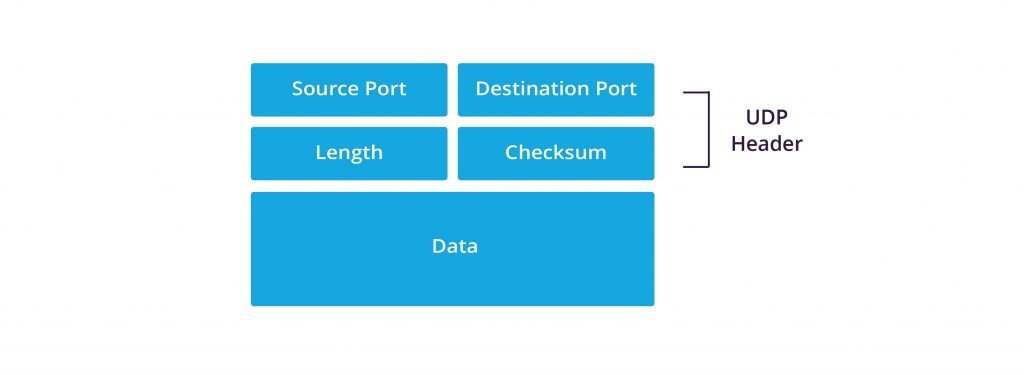
A UDP datagram consists of:
- Header (8 bytes)
- Payload (variable length)
Yes — the entire UDP header is only 8 bytes.
That’s significantly smaller than Transmission Control Protocol (TCP), whose header is at least 20 bytes (without options).
Here’s the UDP header format:
| Field | Size | Purpose |
|---|---|---|
| Source Port | 16 bits | Identifies the sending application |
| Destination Port | 16 bits | Identifies the receiving application |
| Length | 16 bits | Total size of UDP header + data |
| Checksum | 16 bits | Error detection |
Let’s break these down in detail.
1️⃣ Source Port (16 bits)
The Source Port identifies which application on the sender’s machine generated the datagram.
- Range: 0–65535
- Often dynamically assigned (ephemeral ports)
Example:
If a client sends a DNS request, it might use:
- Source Port: 53021
- Destination Port: 53 (standard DNS port)
The response from the server will swap these values.
This enables bidirectional communication without a connection.
2️⃣ Destination Port (16 bits)
The Destination Port tells the receiving operating system which application should process the data.
This is how multiplexing works:
- DNS → Port 53
- NTP → Port 123
- VoIP → Often dynamic UDP ports
When a datagram arrives, the OS:
- Reads the destination port
- Checks which process is bound to that port
- Delivers the payload directly to that process
No session tracking. No stream reassembly. Just port-based delivery.
3️⃣ Length Field (16 bits)
The Length field specifies the total size of the UDP datagram:
Length = Header (8 bytes) + Data
Minimum value: 8 bytes (header only)
Maximum theoretical size: 65,535 bytes
In practice, the size is limited by the underlying IP layer and network MTU (Maximum Transmission Unit).
If a datagram exceeds the MTU:
- IP fragmentation may occur
- Fragment loss means full datagram loss
UDP itself does not handle fragmentation or reassembly logic — that’s delegated to IP.
4️⃣ Checksum (16 bits)
The Checksum provides error detection.
It is calculated over:
- UDP header
- UDP payload
- A pseudo-header from IP (including source/destination IP addresses)
Why include IP addresses in the checksum?
To protect against misrouted packets.
If the packet arrives with altered bits due to transmission errors, the checksum validation fails, and the datagram is discarded.
Important distinctions:
- In IPv4, the checksum is optional (can be zero).
- In IPv6, the checksum is mandatory.
What the checksum does not do:
- It does not request retransmission.
- It does not correct errors.
- It does not guarantee delivery.
If validation fails, the packet is simply dropped.
Encapsulation: From Application to Wire
Let’s walk through a real example.
Imagine a client querying a DNS server.
Step 1 – Application Layer
The DNS resolver generates a query message.
Step 2 – UDP Layer
UDP:
- Adds source port
- Adds destination port (53)
- Calculates length
- Computes checksum
Step 3 – IP Layer
IP:
- Adds source and destination IP addresses
- Handles routing
- May fragment if necessary
Step 4 – Data Link Layer
Frame is prepared (Ethernet, Wi-Fi, etc.) and sent.
At the receiver side:
- Ethernet frame stripped
- IP header processed
- UDP header processed
- Payload delivered to the application bound to port 53
No acknowledgment is sent at the UDP level.
No Handshake, No State, No Recovery
To truly understand UDP, it’s equally important to understand what it doesn’t do.
UDP does not:
- Establish a connection (no three-way handshake)
- Maintain sequence numbers
- Guarantee packet order
- Detect duplicates
- Implement flow control
- Implement congestion control
- Retransmit lost packets
Each datagram is independent.
If packets arrive out of order, UDP doesn’t care.
If packets are lost, UDP doesn’t know.
If packets arrive twice, UDP doesn’t prevent it.
This dramatically reduces overhead — but shifts responsibility to the application layer.
Engineering Implications
Because UDP provides only:
- Port multiplexing
- Basic error detection
- Best-effort delivery
Applications built on top of UDP must decide:
- Should we implement our own reliability?
- Should we tolerate loss?
- Should we implement congestion control?
- Should we reorder packets?
This flexibility is precisely why modern protocols like QUIC use UDP as a foundation — they implement reliability and encryption at higher layers while avoiding TCP’s kernel-level constraints.
Performance Characteristics
From a systems perspective, UDP:
- Has lower latency than TCP
- Has lower CPU overhead
- Requires less memory (no connection state tables)
- Scales efficiently under high traffic loads
This makes it ideal for:
- Real-time media
- High-frequency telemetry
- Multiplayer gaming
- Service discovery protocols
But it also makes it dangerous if misused — especially in environments where packet loss cannot be tolerated.
Key Takeaway
Under the hood, UDP is remarkably simple:
- 8-byte header
- Stateless operation
- Best-effort delivery
It provides just enough structure to enable multiplexed communication — and nothing more.
That simplicity is not a limitation.
It is the reason UDP remains fundamental to modern Internet architecture.
3. UDP vs TCP: Engineering Trade-Offs
Choosing between UDP and TCP is not about “better” or “worse.”
It’s about which trade-offs your system can afford.
At the transport layer, the Internet gives engineers two fundamentally different tools:
- Transmission Control Protocol (TCP)
- User Datagram Protocol (UDP)
They solve different problems. Understanding their differences is essential for designing scalable, high-performance systems.
The Core Philosophical Difference
At a high level:
- TCP prioritizes reliability.
- UDP prioritizes timeliness.
TCP assumes:
Data must arrive correctly and in order.
UDP assumes:
Data should arrive quickly — correctness and order are optional.
That design choice affects everything: performance, scalability, complexity, and application behavior.
Connection-Oriented vs Connectionless
TCP: Connection-Oriented
Before transmitting data, TCP performs a three-way handshake:
- SYN
- SYN-ACK
- ACK
This establishes:
- Session state
- Sequence numbers
- Initial congestion window
- Flow control parameters
The connection remains tracked until explicitly closed.
This guarantees reliability — but introduces latency and state overhead.
UDP: Connectionless
UDP sends data immediately.
There is:
- No handshake
- No session establishment
- No persistent state
Each datagram is independent.
For latency-sensitive systems, eliminating the handshake can reduce startup delay significantly — especially in high-frequency or short-lived communications.
Reliability Mechanisms
TCP Provides:
- Sequence numbers
- Acknowledgments (ACKs)
- Retransmissions
- Sliding window flow control
- Congestion control algorithms
- Ordered delivery
- Duplicate detection
If a packet is lost:
- TCP detects it.
- TCP retransmits it.
- TCP ensures proper ordering.
This makes TCP ideal for:
- File transfers
- Web content
- Database synchronization
- Financial systems
UDP Provides:
- Best-effort delivery
- Checksum-based error detection
If a packet is lost:
- Nothing happens at the protocol level.
If packets arrive out of order:
- UDP does not reorder them.
If packets are duplicated:
- UDP does not suppress them.
This is not negligence — it’s intentional minimalism.
Latency and Performance
Latency is where the differences become most visible.
TCP Latency Sources
- Handshake delay
- Retransmission delay
- Head-of-line blocking
- Congestion control backoff
If one packet is lost in a TCP stream, subsequent packets may be held until retransmission occurs. This is known as head-of-line blocking.
In real-time systems, that delay can be unacceptable.
UDP Latency Characteristics
- No handshake delay
- No retransmission delay
- No ordering delay
- No congestion window startup
Packets are delivered to the application immediately upon arrival.
Lost packets are simply ignored.
For applications like:
- Live video
- Voice calls
- Online gaming
Receiving slightly imperfect data now is better than receiving perfect data too late.
Overhead Comparison
| Feature | TCP | UDP |
|---|---|---|
| Header Size | 20–60 bytes | 8 bytes |
| Connection Setup | Required | None |
| Reliability | Yes | No |
| Ordering | Guaranteed | Not guaranteed |
| Congestion Control | Built-in | None |
| Flow Control | Yes | No |
| Retransmission | Yes | No |
| State Maintenance | Yes | No |
From a systems perspective:
- TCP consumes more memory (connection tables).
- TCP consumes more CPU (state tracking, congestion algorithms).
- UDP scales more easily in high-throughput stateless systems.
Congestion Control: A Critical Distinction
TCP includes sophisticated congestion control algorithms (e.g., slow start, congestion avoidance).
These mechanisms:
- Prevent network collapse
- Adapt transmission rate dynamically
UDP has no built-in congestion control.
If misused, a high-rate UDP sender can overwhelm a network.
For this reason, many modern protocols built on UDP implement their own congestion control mechanisms at the application layer — such as QUIC.
Real-World Engineering Decision Example
Consider two scenarios:
Scenario A: File Download
A corrupted or missing byte invalidates the entire file.
TCP is the correct choice.
Scenario B: Live Video Call
A single lost frame is barely noticeable.
Waiting 300ms for retransmission would degrade the experience far more than losing that frame.
UDP is the correct choice.
Head-of-Line Blocking: A Practical Insight
One of TCP’s major constraints is head-of-line blocking.
Because TCP enforces strict ordering:
- If packet #5 is lost,
- Packets #6, #7, and #8 must wait.
Even if they arrived correctly.
UDP does not enforce ordering.
Applications can:
- Process packets independently
- Drop outdated ones
- Implement selective recovery
This is a major reason why modern web transport evolution moved toward UDP-based designs.
The Engineering Trade-Off Summary
The choice between TCP and UDP is essentially a trade between:
- Reliability vs latency
- Control vs flexibility
- Built-in mechanisms vs application-level logic
TCP simplifies application development by handling complexity internally.
UDP increases application responsibility — but enables greater performance control.
Key Takeaway
UDP is not a “lighter TCP.”
TCP is not a “safer UDP.”
They represent two distinct design philosophies:
- TCP: Protect the data.
- UDP: Protect the timing.
Choosing correctly depends entirely on your system’s priorities.
4. Real-World Use Cases of UDP
Understanding UDP conceptually is important.
Understanding where it is actually used in production systems is what makes it relevant.
Despite its lack of built-in reliability, UDP powers some of the most critical services on the Internet — precisely because of its simplicity and low latency.
Let’s explore where and why engineers deliberately choose UDP.
1️⃣ DNS – Fast, Stateless Queries
The Domain Name System (DNS) is one of the most fundamental services on the Internet.
Every time you access a website, a DNS query translates a domain name into an IP address.
Why UDP?
- DNS queries are typically small (a few dozen bytes)
- Responses are usually small
- Speed is more important than guaranteed delivery
- Queries are stateless and short-lived
If a DNS packet is lost?
- The client simply retries.
Establishing a full TCP connection for every DNS lookup would introduce unnecessary overhead and latency.
(Although DNS can fall back to TCP when responses are large — for example, during zone transfers.)
UDP makes DNS scalable to billions of daily queries worldwide.
2️⃣ Real-Time Voice and Video (VoIP & Streaming)
Voice over IP and live streaming systems rely heavily on UDP.
In real-time communication:
- A delayed packet is often useless.
- Retransmission introduces latency.
- Slight packet loss is tolerable.
Imagine a live video call:
- If a video frame is lost, the next frame quickly replaces it.
- Waiting for retransmission would freeze the stream.
Protocols like RTP (Real-time Transport Protocol) are commonly built on top of UDP, implementing timing and sequencing at the application layer.
UDP allows:
- Continuous streaming
- Minimal buffering delay
- Predictable latency behavior
This is essential for conferencing systems, live broadcasts, and interactive media.
3️⃣ Online Multiplayer Gaming
Online gaming is one of the clearest examples of why UDP exists.
Game engines exchange:
- Player position updates
- Movement vectors
- Action events
- State synchronization data
These updates happen dozens of times per second.
If one update is lost:
- The next update replaces it.
What matters is current state, not historical perfection.
Using TCP would introduce:
- Retransmission delays
- Head-of-line blocking
- Increased jitter
In fast-paced multiplayer environments, even 100ms of extra latency can degrade user experience significantly.
UDP gives game developers control over:
- Packet frequency
- Loss tolerance
- Custom reliability mechanisms (if needed)
4️⃣ QUIC and Modern Web Transport
One of the most significant evolutions in Internet transport is QUIC.
QUIC is built on top of UDP.
Why build a reliable protocol on top of an unreliable one?
Because UDP provides:
- User-space implementation flexibility
- No kernel-level TCP constraints
- Faster handshake mechanisms
- Improved multiplexing without head-of-line blocking
QUIC is now used by:
- Google Chrome
- Modern HTTP/3 implementations
It combines:
- Reliability
- Encryption (TLS 1.3)
- Congestion control
- Stream multiplexing
All on top of UDP.
UDP acts as a fast, flexible substrate.
This demonstrates that UDP is not outdated — it is foundational to the modern Internet.
5️⃣ Telemetry, Monitoring, and IoT
In distributed systems and IoT environments, UDP is often used for:
- Telemetry streams
- Sensor data
- Service discovery
- Log aggregation
In many of these scenarios:
- High throughput is required
- Occasional packet loss is acceptable
- Low overhead is critical
For example:
- Environmental sensors transmitting periodic measurements
- Internal metrics inside data centers
- Real-time monitoring dashboards
UDP enables scalable data ingestion with minimal protocol overhead.
6️⃣ Broadcast and Multicast Communication
UDP supports broadcast and multicast transmission.
This allows:
- One-to-many communication
- Efficient service discovery
- Network announcements
TCP does not support broadcast or multicast.
In enterprise networks, UDP multicast is frequently used for:
- Streaming internal video feeds
- Network discovery protocols
- Cluster communication
This makes UDP particularly valuable in controlled network environments.
Why These Use Cases Have Something in Common
Across all these examples, a pattern emerges:
They prioritize:
- Low latency
- High throughput
- Stateless communication
- Tolerance to packet loss
They do not require:
- Perfect ordering
- Guaranteed delivery
- Built-in congestion logic
UDP thrives in systems where:
Timeliness is more valuable than completeness.
Key Takeaway
UDP is not a niche protocol.
It powers:
- DNS lookups
- Real-time voice and video
- Multiplayer gaming
- Modern web transport (via QUIC)
- IoT and telemetry systems
Its simplicity makes it scalable.
Its statelessness makes it efficient.
Its flexibility makes it foundational.
Understanding UDP’s real-world usage reveals why it remains one of the most important transport protocols in Internet architecture.
5. When NOT to Use UDP
By now, UDP may look like the perfect performance tool.
It’s fast.
It’s lightweight.
It scales beautifully.
But in many systems, using UDP would be a serious architectural mistake.
Understanding when not to use UDP is just as important as understanding when to use it.
1️⃣ When Data Integrity Is Critical
If your application cannot tolerate missing or corrupted data, UDP alone is not sufficient.
Examples:
- File transfers
- Database replication
- Financial transactions
- Software updates
- Backup systems
In these scenarios:
- A single lost packet can corrupt the entire dataset.
- Silent data loss is unacceptable.
- Delivery guarantees are mandatory.
This is where Transmission Control Protocol (TCP) excels.
TCP ensures:
- Reliable delivery
- Ordered transmission
- Automatic retransmission
- Congestion and flow control
UDP provides none of these guarantees.
2️⃣ When Packet Ordering Matters
UDP does not guarantee order.
Packets may:
- Arrive out of sequence
- Arrive duplicated
- Never arrive
If your system depends on strict ordering — for example:
- Transaction logs
- Event streams with strict causality
- Sequential processing pipelines
Then UDP requires additional logic at the application layer to:
- Track sequence numbers
- Buffer out-of-order packets
- Detect missing segments
At that point, you are effectively re-implementing features already provided by TCP.
3️⃣ When Congestion Control Is Required
One of the most overlooked aspects of UDP is the absence of built-in congestion control.
TCP automatically adjusts its sending rate based on:
- Network conditions
- Packet loss
- Round-trip time
UDP does not.
An aggressive UDP sender can:
- Overwhelm network links
- Cause packet loss across unrelated flows
- Contribute to network instability
In large-scale systems, this can become a serious operational risk.
Modern UDP-based protocols such as QUIC implement their own congestion control precisely because this responsibility cannot be ignored.
If your application does not implement congestion management, UDP can be dangerous at scale.
4️⃣ When You Need Simplicity at the Application Layer
TCP pushes complexity into the transport layer.
UDP pushes complexity into the application layer.
If your team:
- Does not need ultra-low latency
- Does not have resources to implement reliability mechanisms
- Wants predictable behavior without custom logic
Then TCP often reduces development complexity.
Using UDP properly requires:
- Careful design decisions
- Custom reliability mechanisms (if needed)
- Monitoring of packet loss and jitter
- Defensive engineering
For many enterprise systems, TCP is simply safer and easier.
5️⃣ Security Considerations
UDP introduces additional security challenges.
Because it is connectionless:
- Source IP addresses can be spoofed.
- It is commonly exploited in reflection and amplification attacks.
- It does not validate session legitimacy.
Examples include:
- DNS amplification attacks
- NTP amplification attacks
In these cases, attackers send small spoofed UDP requests that trigger large responses toward victims.
TCP’s handshake mechanism makes such spoofing significantly harder.
If security posture is a primary concern, UDP requires:
- Rate limiting
- Validation mechanisms
- Application-layer authentication
- Careful exposure management
6️⃣ Large Data Transfers Over Unreliable Networks
UDP does not handle:
- Fragment recovery
- Path MTU adaptation
- Retransmission of fragmented packets
If large datagrams are fragmented at the IP layer and one fragment is lost:
→ The entire datagram is discarded.
For large data transfers over unreliable or high-latency networks, TCP is generally more robust and efficient.
The Strategic Perspective
UDP is powerful because it is minimal.
But minimalism means responsibility shifts upward.
You should avoid UDP when:
- You need guaranteed delivery
- You need strict ordering
- You cannot tolerate loss
- You cannot implement congestion control
- You require built-in reliability
In those cases, TCP is not “slower.”
It is simply solving a different problem.
Final Takeaway
UDP is not unreliable by accident.
It is unreliable by design.
It exists for systems where:
Speed matters more than perfection.
But in systems where correctness, consistency, and guaranteed delivery are essential, UDP alone is insufficient.
The key is not choosing the fastest protocol.
The key is choosing the right protocol for your system’s constraints.
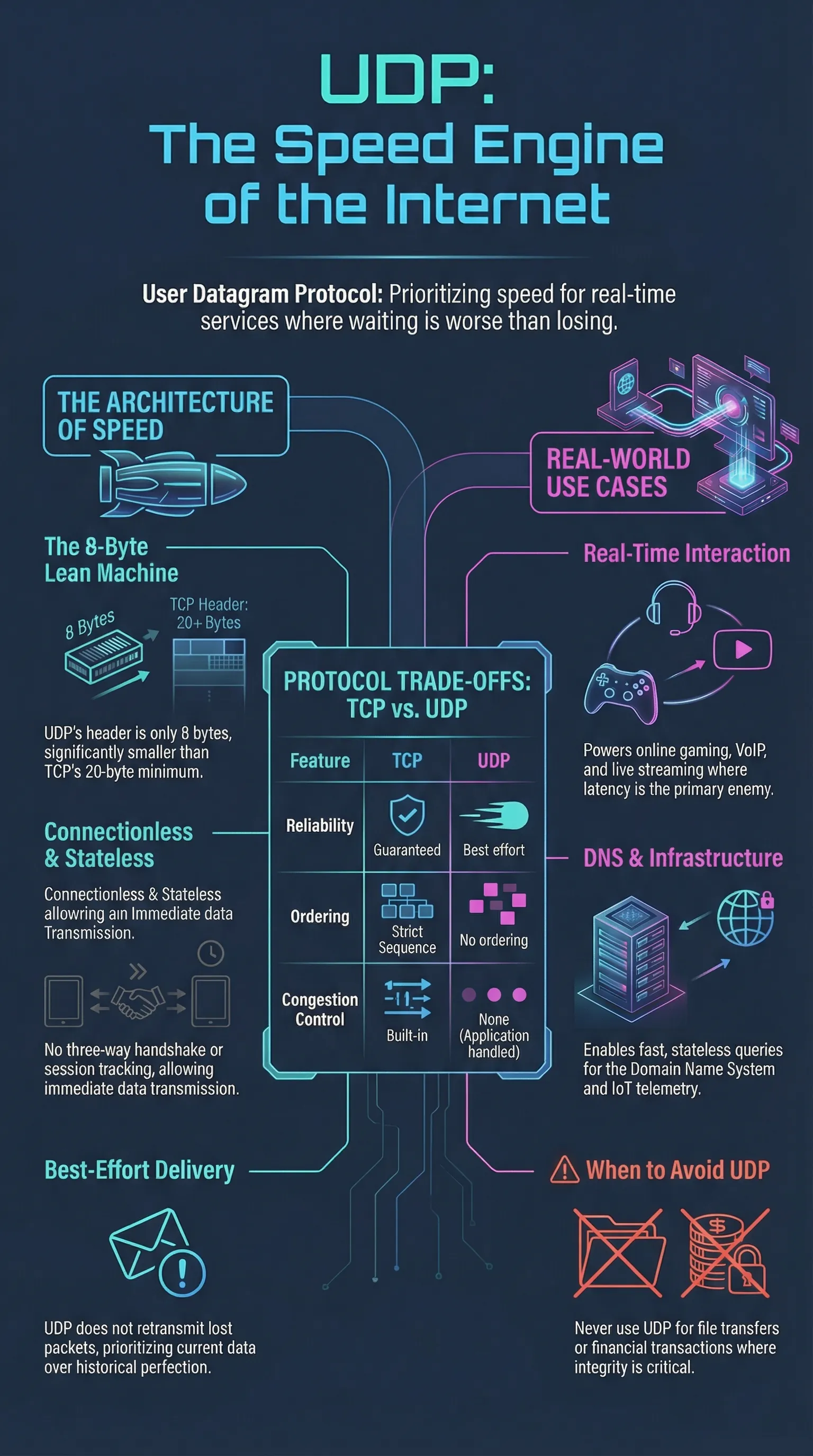
6. Infographics
UDP is used for the following services and functions in a Microsoft Windows networking environment:
- NetBIOS name resolution using subnet UDP broadcasts sent to all hosts on a subnet or using unicast UDP packets sent directly to a Windows Internet Name Service (WINS) server
- Domain Name System (DNS) host name resolution using UDP packets sent to name servers
- Trivial File Transfer Protocol (TFTP) services
Broadcast storm
If a router is configured to allow 255.255.255.255 broadcasts, a broadcast storm can occur on the internetwork and bring network services to a halt. You should generally configure routers to allow only directed network traffic if possible.
External references:
UDP and TCP: Comparison of Transport Protocols
I’d tell you a UDP joke but I’m afraid you won’t get it. 😉