
Your laptop, phone, and desktop can browse the internet at the same time while sharing a single public IPv4 address. How does your router know which device should receive each reply? Network Address Translation (NAT), usually combined with port translation, makes this possible. Understanding that process also explains why browsing works immediately, while hosting a server at home may require port forwarding—or a closer look at your ISP’s network.
What Is Network Address Translation (NAT)?
Network Address Translation (NAT) changes IP addresses in packets as they pass between networks. A common use is connecting a private IPv4 network to the internet while conserving public IPv4 addresses.
There is an important distinction: basic NAT translates IP addresses; Network Address and Port Translation (NAPT), commonly called Port Address Translation (PAT), also translates transport identifiers, such as TCP or UDP port numbers. PAT is the form commonly used by home routers to let many devices share one public IPv4 address.
NAT can run on a router, a firewall appliance, or another gateway. Translation and firewall filtering are separate functions, even when the same device performs both.
How NAT Works
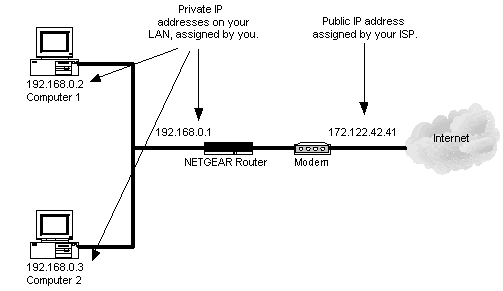
In the diagram, Computer 1 uses 192.168.0.2, Computer 2 uses 192.168.0.3, and the router’s LAN address is 192.168.0.1. These are private IPv4 addresses. The illustrated public address, 172.122.42.41, represents the address used on the internet-facing side of the connection.
The modem’s operating mode is not specified in the image. For this explanation, assume that it passes traffic through without performing another translation. A modem that also acts as a NAT router could introduce double NAT.
Suppose both computers open an HTTPS connection to the same server. With PAT, the router could create these mappings:
| Device | Source on the LAN | Translated source on the internet |
|---|---|---|
| Computer 1 | 192.168.0.2:49160 | 172.122.42.41:54001 |
| Computer 2 | 192.168.0.3:49160 | 172.122.42.41:54002 |
The colon separates the IP address from the port number. These ports are illustrative; the diagram itself does not show ports or a translation table.
The router replaces each packet’s source address and, in this example, its source port. It records the mappings and updates the affected checksums. The server sees two connections from the same public IP address, distinguished by different source ports.
When a reply returns to port 54001, the router translates its destination back to 192.168.0.2:49160. Replies to 54002 go to Computer 2. The translation table connects each reply to the appropriate internal device.
A router does not have to change every source port: it may preserve the original port when its allocation rules allow it. Mappings are temporary and are eventually removed according to connection state and timeout rules.
Static NAT, Dynamic NAT, and PAT
Static NAT
Static NAT creates a fixed, one-to-one mapping between an internal address and an external address. For example, an administrator could map 192.168.0.10 to 203.0.113.10. The latter belongs to a range reserved for documentation; a real deployment needs an appropriate external address.
This mapping can support connections initiated from either side, provided that routing, firewall rules, and the service configuration allow them. Static NAT translates an entire address; forwarding one TCP or UDP port to an internal service is a more specific mapping, often called static PAT or port forwarding.
Dynamic NAT
Dynamic basic NAT allocates an external address from a pool when an internal host needs a mapping. That host can use the same address binding for multiple simultaneous connections. It does not necessarily receive a different public address for every connection.
For example, a pool of ten external addresses can provide ten simultaneous one-to-one address bindings, even if the private network contains fifty hosts. When no address is available, another host cannot obtain a new binding until one is released. Inactive bindings can return to the pool after the applicable timeout.
This differs from PAT, which allows many hosts to share an external address through port translation.
PAT and Masquerading
PAT combines address translation with port mappings. It is also called NAPT or NAT overload. For TCP and UDP traffic, these mappings allow multiple internal hosts and connections to share one external IPv4 address, as in the diagram’s worked example.
In Linux networking, masquerading has a specific meaning: it is a form of source NAT that automatically uses the outgoing interface’s current IP address. This is useful when that address changes, as it can on an ISP connection. An explicit SNAT rule is commonly used when the translated source address is known and fixed.
There is no universal NAT limit of 4,096 connections. Capacity depends on the implementation, available port mappings, connection-tracking resources, and timeout settings. The number of usable ports alone does not define every device’s total connection capacity.
Does NAT Make a Network Secure?
NAT is not a substitute for a firewall, and it does not encrypt traffic. In a typical home-router setup, unsolicited inbound connections lack a mapping to an internal device. That behavior can restrict inbound access, but it is not a complete security policy.
A firewall explicitly controls permitted traffic. Devices still need appropriate authentication, software updates, and service configuration—especially when port forwarding makes a service reachable from the internet.
NAT and IPv6
IPv6’s much larger address space removes the address-conservation need for IPv4-style PAT in ordinary native IPv6 connectivity. Devices can use globally routable IPv6 addresses while a stateful firewall controls inbound access.
Translation still has other uses. For example, NAT64 allows IPv6-only clients to communicate with IPv4 servers. IPv6 therefore changes the role of translation rather than making every kind of NAT obsolete.
When NAT Causes Connection Problems
Outgoing browsing can work while incoming connections to a home server fail. With PAT, an incoming connection generally needs a suitable mapping, such as a port-forwarding rule, as well as permission from the relevant firewalls.
If another router or your ISP also performs NAT, a rule on your own router may not be enough. Follow our guide to port forwarding that is not working: checking CGNAT and double NAT to identify where the connection is blocked.
References
- RFC 3022: Traditional IP Network Address Translator — basic NAT and NAPT. This specification superseded RFC 1631.
- RFC 2663: IP Network Address Translator Terminology and Considerations — address assignments and bindings.
- RFC 4787: NAT Behavioral Requirements for Unicast UDP — UDP mappings and port allocation.
- Netfilter nftables manual — SNAT and masquerading in Linux.
- RFC 4864: Local Network Protection for IPv6 — firewall protection and the distinction between NAT and security.
- RFC 6146: Stateful NAT64 — IPv6-to-IPv4 translation.
- RFC 1918: Address Allocation for Private Internets and RFC 5737: IPv4 Address Blocks Reserved for Documentation — private and example address ranges.